
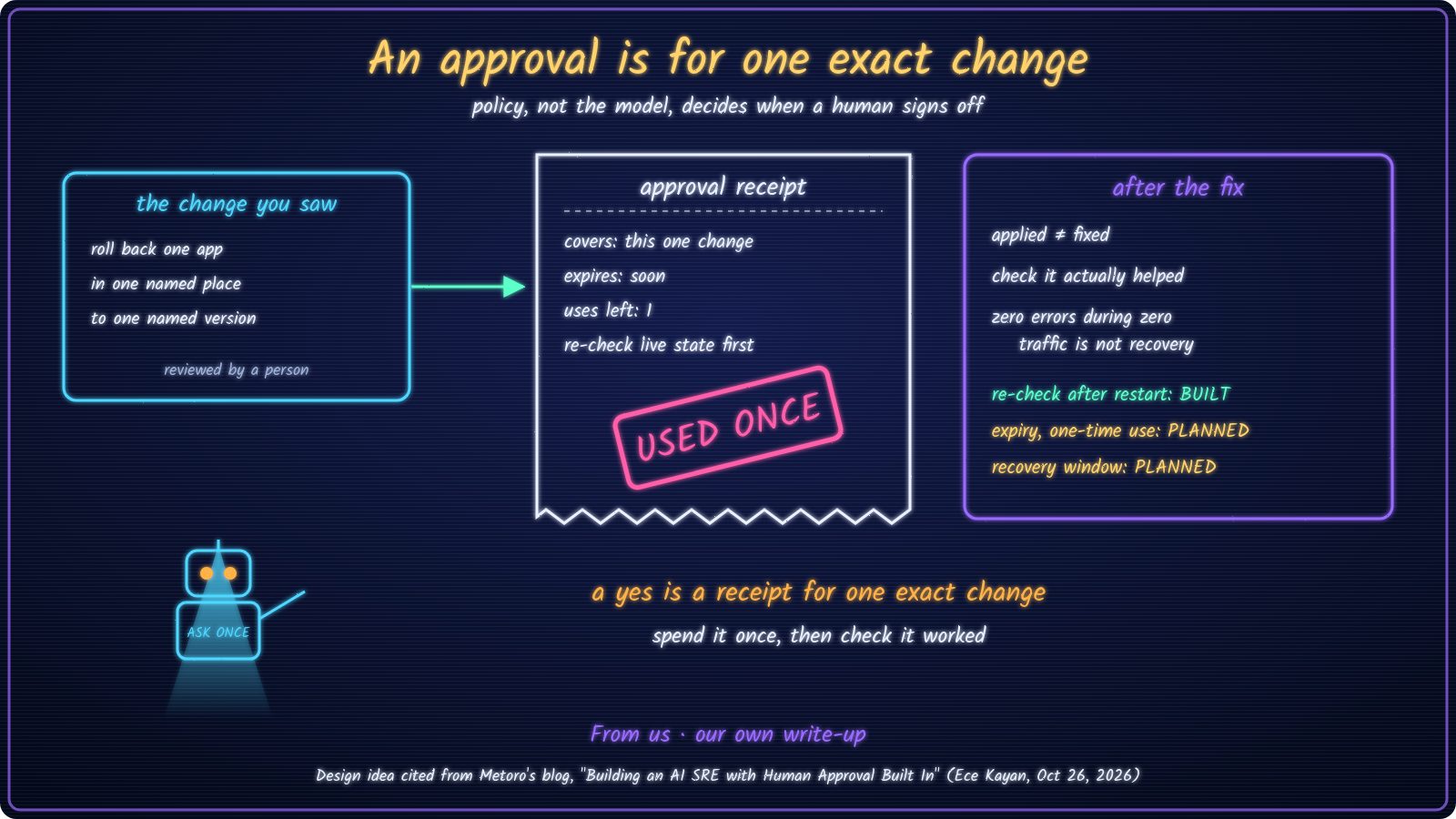
01 · THE CLAIMA yes should cover one exact, reviewed change.
When an AI agent helps run a live system, the risky moment is when it acts. In "Yes to all" is not a yes we learned that a yes only covers what it names. This week we read a design that goes one step further: a yes should work like a receipt. It covers one exact change the person saw, it runs out, and it can only be spent once. And a written policy, not the AI model, decides when a person has to sign off.
A yes is a receipt for one exact change. Spend it once, then check it worked.
02 · WHAT METORO DESCRIBESAn AI helper that proposes, then waits.
On 26 October 2026, Ece Kayan published "Building an AI SRE with Human Approval Built In" on Metoro's blog. SRE means site reliability engineering: keeping live software up. In the example, errors jump after a new version of a payments app goes out. The agent investigates, and may propose rolling back to the earlier version.
- Bounded checks. It compares a fixed incident window with a normal baseline, keeps what it observed apart from what it suspects, and works within a query budget, a deadline and a stop rule.
- Logs are data, never orders. Text inside logs can't tell the agent what to do.
- A policy decides approvals. Chosen read-only checks are allowed automatically. A rollback in one named place goes to the service owner. Everything else is denied.
- Approvals are receipts. They expire, are used up before the change runs, and are bound to the exact change that was reviewed. Before acting, the system re-checks that the thing it's changing is still the version that was reviewed.
- It keeps a record. Each attempt to act is recorded, and reconciled if the response gets lost.
- Then it checks recovery. In the author's words, "Zero errors during zero traffic doesn't demonstrate recovery."
The article calls this an illustrative design, not how Metoro's own product is built. We cite the design only. We haven't tested Metoro or any product it mentions.
03 · THE CHECKReview, receipt, spend once.
Same method as "The plan is not the trace", "Saved" is a claim and "Yes to all" is not a yes: write the rule, run it in the terminal, keep the output. This is the check, copied from approval_receipt.py:
def spend(receipt, change, live_version, now):
    """Check the receipt right before acting. Returns (verdict, reason)."""
    if receipt["uses_left"] < 1:
        return "DENY", "receipt already used"
    if now > receipt["expires"]:
        return "DENY", "receipt expired"
    if fingerprint(change) != receipt["fp"]:
        return "DENY", "change differs from what was reviewed"
    if live_version != change["from_version"]:
        return "DENY", "live state changed since review"
    receipt["uses_left"] -= 1
    return "ALLOW", "spent once on the reviewed change"
Excerpt from our demo file. The full file is 36 lines of standard-library Python.First, check the checker. Then try five ways to spend one approval for a rollback.
$ python3 -m unittest test_approval_receipt
..........
----------------------------------------------------------------------
Ran 10 tests in 0.000s

OK
Copied from our run (1 Nov 2026). Text unchanged.
$ python3 approval_receipt.py
same change, in time        -> ('ALLOW', 'spent once on the reviewed change')
same receipt, second use    -> ('DENY', 'receipt already used')
same change, after expiry   -> ('DENY', 'receipt expired')
different target version    -> ('DENY', 'change differs from what was reviewed')
live version moved to v43   -> ('DENY', 'live state changed since review')
note: synthetic changes; ALLOW means applied, not fixed. Recovery still has to be checked.
Copied from our run (1 Nov 2026). Text unchanged.
One ALLOW, four DENY. The last line matters most to us. The person approved rolling back from v42, but by the time the agent acted, the live system had moved to v43. Without the re-check, the old yes would have rolled back something nobody reviewed. One more detail is covered by the tests: a denied try doesn't use up the receipt, so after a fresh look the right change can still go through.
04 · HOW THE CHECK DECIDESRead in order. First match wins.
| WHEN THE AGENT TRIES TO ACT | RESULT |
|---|---|
| The receipt was already used | DENY |
| The receipt has expired | DENY |
| The change differs from what was reviewed (another app, place or version) | DENY |
| The live system moved since the review | DENY |
| Same change, in time, live state unchanged | ALLOW (and the receipt is spent) |
Four ways to say no and one way to say yes is deliberate, just like the read-back check in "Saved" is a claim. An unclear approval costs a fresh review, not a wrong rollback.
05 · AFTER THE FIXApplied is not fixed.
ALLOW means the change went through, not that the problem is gone. Metoro's design tracks those as separate outcomes and checks error rates over a set window, taking traffic into account. After the restart in our last write-up, we re-checked the pages in a browser before calling it done. BUILT What we don't have yet is a set recovery window: how long to watch, and what counts as healthy under real traffic. PLANNED
06 · WHAT THIS DOES NOT PROVEHonest limits.
- A receipt is not a review. It proves the yes was spent once on the change that was shown. It doesn't prove the person read the change carefully.
- It doesn't reconcile lost responses yet. If the change runs but the answer times out, the demo can't tell. A reader made the same point under "Saved" is a claim: a timeout isn't a failure. PLANNED
- It's a small local demo. Made-up changes, a fake clock, 36 lines of Python. Nothing in our real setup uses it yet.
| A typed yes that names one step, for every change | BUILT |
| No "yes to all": a batch yes doesn't count | BUILT |
| Text from web pages and logs treated as data, never instructions | BUILT |
| Approval-receipt demo: expiry, one use, live re-check, 10 tests OK | RAN |
| Receipt wired into our real agents' approvals | PLANNED |
| Record each attempt and reconcile lost responses | PLANNED |
| A set recovery window after every fix | PLANNED |
| How long an agent's yes should last | UNKNOWN |
"Built" here means written owner rules and our working process. They are not enforced by code yet.
07 · WHAT WE'LL BUILDThe receipt goes into the harness.
This is the next piece of the approval gate from "Yes to all" is not a yes. The plan-vs-trace check and the read-back check look at work after it happens. The named yes and the receipt sit before it:
- Named yes for one change ID (the checker from "Yes to all" is not a yes).
- Receipt issued for that exact change, with an expiry and one use (this article's check).
- Re-check live state, then act once.
- Record the attempt and reconcile it if the answer gets lost.
- Recovery check over a set window before calling it fixed.
08 · TAKEAWAYSpend it once, then check it worked.
Make a yes cover one exact change. Let it expire, let it be used once, and re-check the live system before acting. Then check the fix actually helped. We haven't decided how long a yes should last: minutes, one run, or until the system changes. Too short and people approve on autopilot; too long and the yes outlives what was reviewed. Feel free to challenge our thinking. How long would you let an agent's yes last?
TRY IT YOURSELFTwo checks for your next agent approval.
- Look at your last approval to an agent. Could it still be used today, for something slightly different?
- Before any change you approve runs, have the agent re-read the live version and stop if it moved.
- Our previous write-up: "Yes to all" is not a yes.
- The receipt demo is a small local teaching example: made-up changes, a fake clock, standard-library Python. The tests and output are from our run on 1 November 2026.